
Agency Accelerator now supports automated email notifications for three key booking events: Worker Allocation, Worker Change, and Cancellations.
Since off-panel clients are external to the system and do not hold a login, these emails are the most practical way to bridge the communication gap. They ensure clients are kept informed in real-time without requiring manual outreach from your team, professionalising your brand through consistent, tech-led service.
Types of Automated Notifications
When enabled, your off-panel clients will receive the following updates:
- Worker Allocation: Sent automatically when a worker is assigned to a booking. It includes the worker’s name, your agency name, job reference, shift date, and start time.
- Worker Change/Reassignment: Sent if the originally allocated worker is replaced. This provides the client with the revised worker details immediately.
- Cancellation: Sent if a booking is cancelled. This includes the job reference, site, shift date, the name of the person who cancelled, and the reason provided.
How to Enable or Suppress Notifications
You have granular control over which clients receive these communications. By default, notifications are toggled On for all existing and newly created clients.
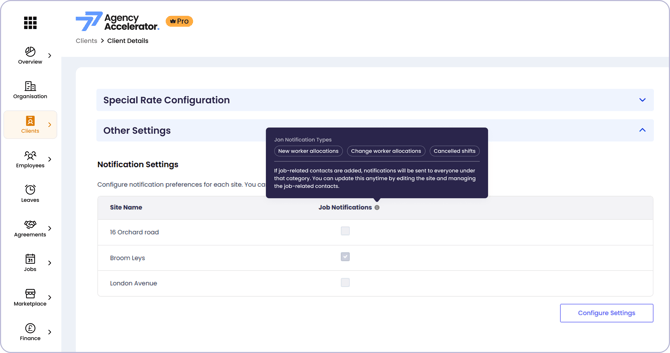
Global Client Notification Checkboxes
To change the settings for a specific client:
- Navigate to the Clients module and select the relevant off-panel client.
- After you access the client profile, locate and click the Settings tab.
- Locate Notification Settings under the Other Settings section.
- Click on the Configure Settings button.
- To enable notifications: Tick the checkbox for the specific client site to turn on all automated outbound communications.
- To suppress notifications: Untick the checkbox for the selected client site to turn off all automated communications.
Important Note on Hierarchy:
- If the checkbox is unticked (OFF): All job notifications are suppressed for that specific site, regardless of your agency-level settings.
- If the checkbox is ticked (ON): The system follows your agency-level configuration. Only the specific notification types enabled at the agency level will be sent.
Understanding the Email Templates
All outbound emails are designed to maintain your professional image:
- Branding: Emails are branded as "{Your Agency Name} | Powered by Agency Accelerator".
- Neutral Vendor Footer: Each email includes a soft commercial touchpoint promoting the neutral-vendor solution, helping to reinforce the technology-led service you provide and encouraging clients to explore cost-saving staffing solutions.
Here is what is included in the three key notification emails:
- Worker Allocation: Confirms the booking and provides the assigned staff member's name, job reference, shift date, and start time.
- Worker Change: Sent if a worker is reassigned. It mirrors the allocation email but prominently displays the new staff member's details.
- Cancellation Notification: Informs the client a shift has been removed. It includes the job reference, site, shift time, who cancelled it, and the specific reason provided.
Audit and Compliance
To ensure accountability, every time a notification setting is changed, it is recorded in the Client Audit Log. This log captures:
- Who changed the setting.
- The timestamp of the change.
- The previous value vs the new value.